How to Track Laptop Location on Windows (Last-Known Location Explained)
Updated Mar 2026
Looking up how to track laptop location on Windows usually leads to GPS trackers — but most workplaces cannot and should not rely on live GPS surveillance. A more practical option is last-known device location: recording the last city or region where a Windows laptop was active, keeping a location history, and using that data for audits, asset visibility, security reviews, or incident response.
For many Windows teams, this is the right balance: more useful than vague sign-in logs, less intrusive than live tracking, and easier to explain to IT, managers, and employees. This guide explains how last-known laptop location works, what its limits are, and when MonitUp makes sense for Windows-based teams.
Quick Answer
- For personal device recovery: Use built-in account or device recovery tools if available.
- For business laptop visibility: Use last-known city-level device location with timestamps and history.
- For audits and reviews: Combine device location history with work activity, app usage, website activity, screenshots on Premium, and reports.
- Important limitation: This is not live GPS tracking. VPNs can affect visible city or region because they may show the VPN exit location.
For personal use
Built-in tools can help with basic recovery or sign-in history, but they may not provide a clear business-ready device history.
For Windows teams
MonitUp helps combine last-known device location with work hours, app usage, website activity, screenshots on Premium, and productivity reports.
Laptop location for Windows teams
Need more than basic laptop location clues?
MonitUp helps Windows-based teams see last-known device location, work hours, app usage, website activity, screenshots on Premium, and productivity reports — without keylogging or live GPS surveillance.
Read about last-known device location | Track a stolen laptop without GPS | See pricing
Table of Contents
- Methods Overview: Device Management vs GPS vs IP-Based Location
- What “Last-Known Location” Means
- How the Workflow Works in MonitUp
- Real-World Business Use Cases
- Limitations and Accuracy
- FAQs
Methods Overview: Device Management vs GPS vs IP-Based Location
When people search for track work laptop, laptop location history, or find laptop location on Windows, they often mix up several different approaches. Here is the practical Windows view:
| Method | What it gives you | Pros | Limits / notes |
|---|---|---|---|
| Device management / MDM | Asset control, device policies, sometimes location signals | Strong governance and enterprise controls | More setup complexity; location depends on tool and device settings |
| Live GPS tracking | Real-time precise coordinates | Very precise when available | High privacy risk; often unnecessary for workplace use |
| IP-based city-level location | Last-known city or region, timestamp, and history | Privacy-balanced, audit-friendly, simple to understand | Not street-level; VPN can affect visible city |
| Account / sign-in history | Login locations and timestamps | Useful for investigations | Not a complete device tracking workflow by itself |
What “Last-Known Location” Means
Last-known device location means the system records where a laptop was located the last time it was active, usually at city or region level, together with a timestamp. Over time, this creates a laptop location history.
- Not live tracking: it does not follow a person in real time on a map.
- Activity-based: it updates when the laptop is used and online.
- Audit-friendly: it creates timestamps and a clear review timeline.
- Privacy-conscious: it avoids street-level GPS positioning for normal workplace visibility.
This makes it useful for teams that need practical answers like: “Where was this device last used?”, “Was it active from an approved region?”, or “Can we export a clear history for review?”
How the Workflow Works in MonitUp
If you want a practical Windows workflow, the process is straightforward:
1. Install the Windows agent
Install MonitUp on the Windows laptops you want to monitor, with a clear internal policy.
2. View last-known location
Review each device’s last-known city or region and timestamp from the dashboard.
3. Combine with work activity
Add context with app usage, website activity, work hours, screenshots on Premium, and productivity reports.
4. Export for review
Use the data for audits, compliance reviews, asset checks, or incident response when needed.
For businesses, location alone is not enough
A last-known city signal can help answer where a device was active. But remote and hybrid teams usually need more context: work hours, app usage, website activity, screenshots on Premium, and productivity reports.
MonitUp connects Windows device visibility with work activity reporting — without keylogging or live GPS surveillance.
Real-World Business Use Cases
1. Asset visibility across remote and hybrid teams
If your company manages Windows laptops across multiple cities or regions, last-known location helps answer where devices were most recently active without requiring live GPS tracking.
2. Remote work audits and location-based review
For organizations with regional rules, client restrictions, or country-based agreements, city-level history can help answer whether a device was active from an expected location.
3. Compliance reporting and internal investigations
Location history can support quarterly audits, security checks, and investigations when combined with device activity records and access policies.
4. Lost or stolen laptop review
If a device disappears, the last-known city and timestamp can help create an incident timeline quickly. For that scenario specifically, read how to track a stolen laptop without GPS.
Limitations and Accuracy
IP-based location is practical, but expectations should be set correctly:
- City-level accuracy: useful for city or region, not street addresses.
- VPN impact: may show the VPN exit city instead of the device’s true city.
- Offline devices: the timeline updates only when the laptop becomes active again.
- Shared networks: hotspots and coworking Wi-Fi can reduce precision.
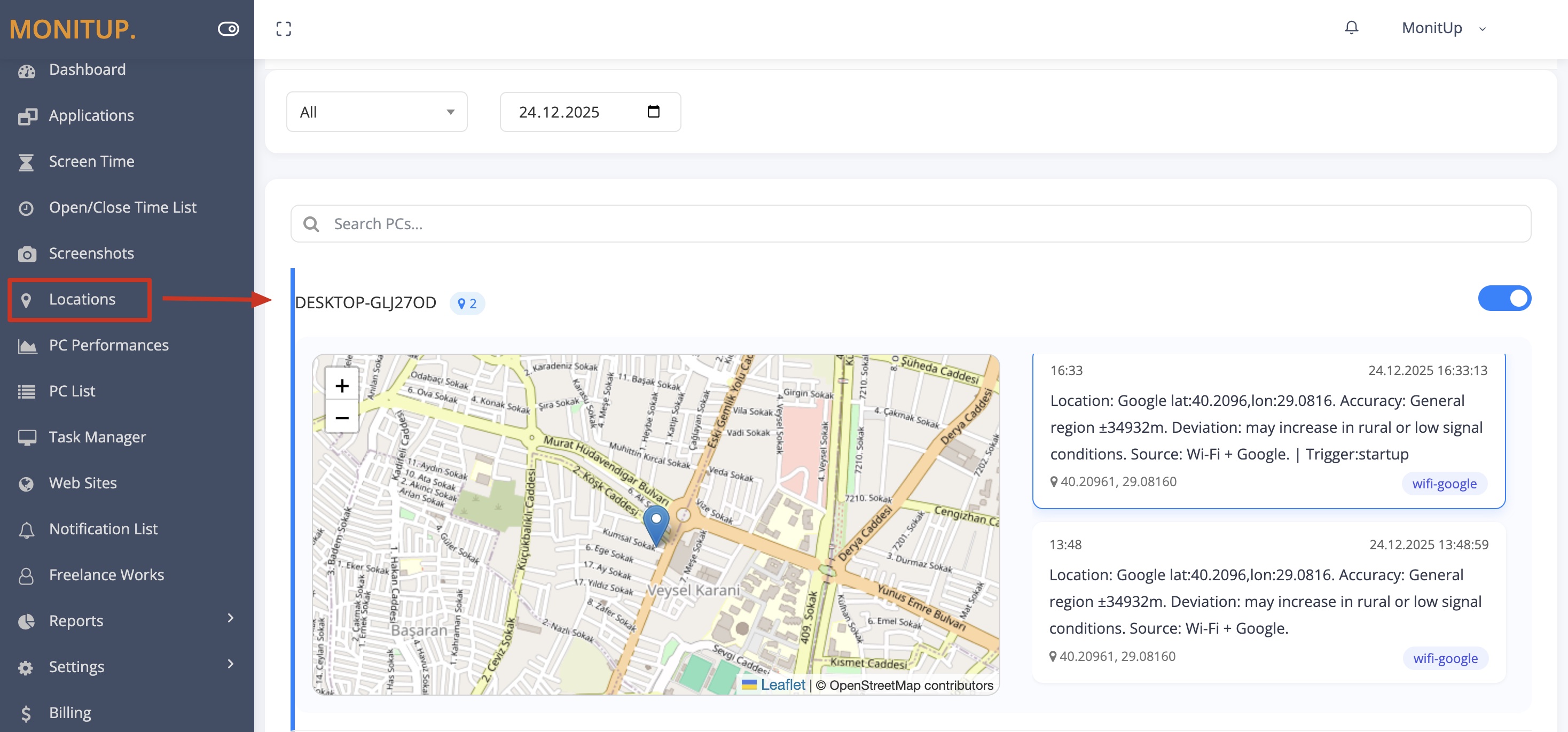
Example dashboard with sample data.
How to Start with MonitUp for Windows Teams
- Create your MonitUp account.
- Choose the plan that matches your visibility needs.
- Install the Windows agent on the laptops you want to monitor.
- Review last-known device location, work hours, app usage, website activity, screenshots on Premium, and productivity reports from the dashboard.
To understand the setup flow before starting, see how MonitUp works .
FAQs
How can I track my laptop location on Windows?
You can track laptop location using device management tools, account sign-in logs, or privacy-conscious systems that record last-known city-level device location when the laptop is active.
Can I see a laptop location history?
Yes. With a last-known approach, you can view a per-device location history timeline and use it for audits, security reviews, compliance checks, or investigations.
Is there a built-in Windows laptop tracker?
Windows has some device and location capabilities depending on settings and accounts, but it is not always designed for business audit workflows. Many organizations use device management or privacy-conscious last-known location tools instead.
Does MonitUp use real-time GPS tracking?
No. MonitUp focuses on practical Windows work visibility. Location-related visibility should be understood as last-known city-level or region-level signals, not live street-level GPS tracking.
How accurate is IP-based laptop location?
It is typically city or region level, not street level. VPNs can change the visible city because the system may show the VPN exit location.
When does MonitUp make more sense than basic location signals?
MonitUp makes more sense when you need laptop location history together with app usage, website activity, screenshots on Premium, work-hour visibility, and reporting for Windows teams.
Turn laptop location into device visibility
See last-known location and work activity in one dashboard
Start a 7-day trial, install the Windows agent, and review last-known device location, work hours, app usage, website activity, screenshots on Premium, and productivity reports from your dashboard.