How to Track a Stolen Laptop (Without GPS): Last-Known Location, Logs & Practical Steps
Updated Mar 2026
If you are searching for how to track a stolen laptop without GPS, the first thing to know is this: most businesses do not rely on live GPS. Instead, they use last-known device location, timestamps, account activity, and audit logs to support incident response.
This will not give you a street address or live pin-point tracking. But it can give your team something more realistic for workplace use: the last known city or region, the last activity time, and a clearer timeline of what happened. This guide explains what to do first, what you can and cannot learn without GPS, and how MonitUp can help Windows teams create a practical incident workflow.
Quick Answer
- Without GPS: Use last-known city or region, timestamps, account activity, and audit logs.
- Best use case: Build an incident timeline for IT, management, insurance, or internal review.
- Important limitation: This is not live GPS tracking and cannot guarantee laptop recovery.
- For Windows teams: MonitUp can help combine last-known location with work activity, app usage, website activity, screenshots on Premium, and reports.
For immediate recovery
Use built-in account recovery tools, lock accounts, revoke sessions, and follow your internal incident process as quickly as possible.
For business incident review
MonitUp helps Windows teams review last-known city-level location, timestamps, work activity, screenshots on Premium, and reports.
Stolen laptop incident workflow
Need more than basic stolen laptop recovery steps?
MonitUp helps Windows-based teams review last-known device location, work hours, app usage, website activity, screenshots on Premium, and productivity reports — without keylogging or live GPS surveillance.
Read the broader laptop location guide | Learn about last-known device location | See pricing
Table of Contents
- What to Do in the First 24 Hours
- What You Can and Cannot Learn Without GPS
- How MonitUp Helps with Stolen Laptop Incident Review
- What Evidence to Export
- VPNs, Accuracy, and Common Limitations
- If the Laptop Never Reconnects
- How to Reduce the Risk Next Time
- FAQs
What to Do in the First 24 Hours
When a laptop is stolen or lost, speed matters. The goal is not only to find the device. It is also to protect company accounts, preserve evidence, and document a clean incident timeline. Adjust the steps below to your own internal policies and local rules.
- Confirm the device: device name, serial number, asset tag, assigned employee, and last known user.
- Check last activity: when was the laptop last active, and what city or region was visible?
- Secure accounts: reset passwords, revoke sessions, rotate tokens, and protect critical apps.
- Start the incident process: open a ticket, assign an owner, and document each action.
- Export evidence: last-known location, timestamps, activity history, and relevant audit logs.
- Notify stakeholders: involve IT, HR, legal, security, management, or insurance contacts if required.
What You Can and Cannot Learn Without GPS
Many people expect live GPS tracking. In reality, most business-friendly workflows focus on last-known active location and device activity logs. That is safer, easier to explain internally, and usually more realistic for Windows laptops.
What you can usually learn
- Last known city or region where the laptop was active
- Time and date of last connection
- Location changes over time through location history
- Unusual patterns, such as sudden country or city changes
- Work activity context if the device was used while monitored
What you usually cannot learn
- Live GPS position of the device
- Exact street address
- Accurate location while fully offline
- True city if a VPN is constantly used
- Guaranteed device recovery
This is why privacy-conscious tracking is often preferred in workplaces: it supports security and audit workflows without turning into invasive real-time surveillance.
How MonitUp Helps with Stolen Laptop Incident Review
MonitUp’s approach is built around practical Windows work visibility. It can help admins review last-known device location at city or region level, timestamps, and activity context when a Windows laptop is active.
1. Capture
The Windows device reports activity signals while it is online and in use.
2. Review
Admins can review last-known city or region, timestamps, and available activity records.
3. Add context
Combine location history with app usage, website activity, work hours, and screenshots on Premium.
4. Report
Use the timeline for incident reports, audits, security reviews, or insurance documentation.
Location alone is not enough for business investigations
A last-known city signal can help you understand where a device was active. But a business incident usually needs more context: account actions, timestamps, app usage, website activity, work hours, screenshots on Premium, and exportable records.
MonitUp helps Windows teams connect device visibility with work activity reporting — without keylogging or live GPS surveillance.
What Evidence to Export
If your goal is to support an internal investigation, insurance claim, or security review, export a clean set of records. This is where stolen laptop tracking becomes genuinely useful.
- Device identity: device name or ID, assigned user, serial number, asset tag
- Last-known location: city or region plus timestamp of last activity
- Location history: the recent timeline, if available
- Activity context: app usage, website activity, work hours, and screenshots on Premium if relevant
- Audit logs: who accessed records and when
- Security actions: account lock, session revoke, password reset, or token rotation times
VPNs, Accuracy, and Common Limitations
City-level tracking is practical, but it has limits. Understanding them reduces false assumptions during an incident.
- VPN impact: the visible location may be the VPN exit city, not the laptop’s actual city.
- City-level precision: useful for region or city, not street-level pinning.
- Coworking spaces and hotspots: shared networks can reduce precision.
- Offline devices: no new records appear until the laptop is active again.
- No recovery guarantee: location history can support an incident process, but it cannot guarantee that the device will be recovered.
If the Laptop Never Reconnects
Sometimes the device never comes online again. Even then, last-known location and activity history can still help you:
- Confirm the last time the device was active
- Narrow the review to a city or region
- Support internal audit trails and insurance documentation
- Show that security response steps were taken quickly
- Close the incident with a clear timeline instead of guesswork
This is why a stolen laptop workflow is usually about evidence and response, not about pretending you have live surveillance.
How to Reduce the Risk Next Time
The best stolen laptop tracker is the one you never need. A basic prevention stack usually includes:
- Asset inventory and device ownership records
- Strong authentication and session control
- Disk encryption and device access policies
- A clear incident response playbook
- Privacy-conscious location history for audits and recovery support
- Employee communication about what is monitored and why
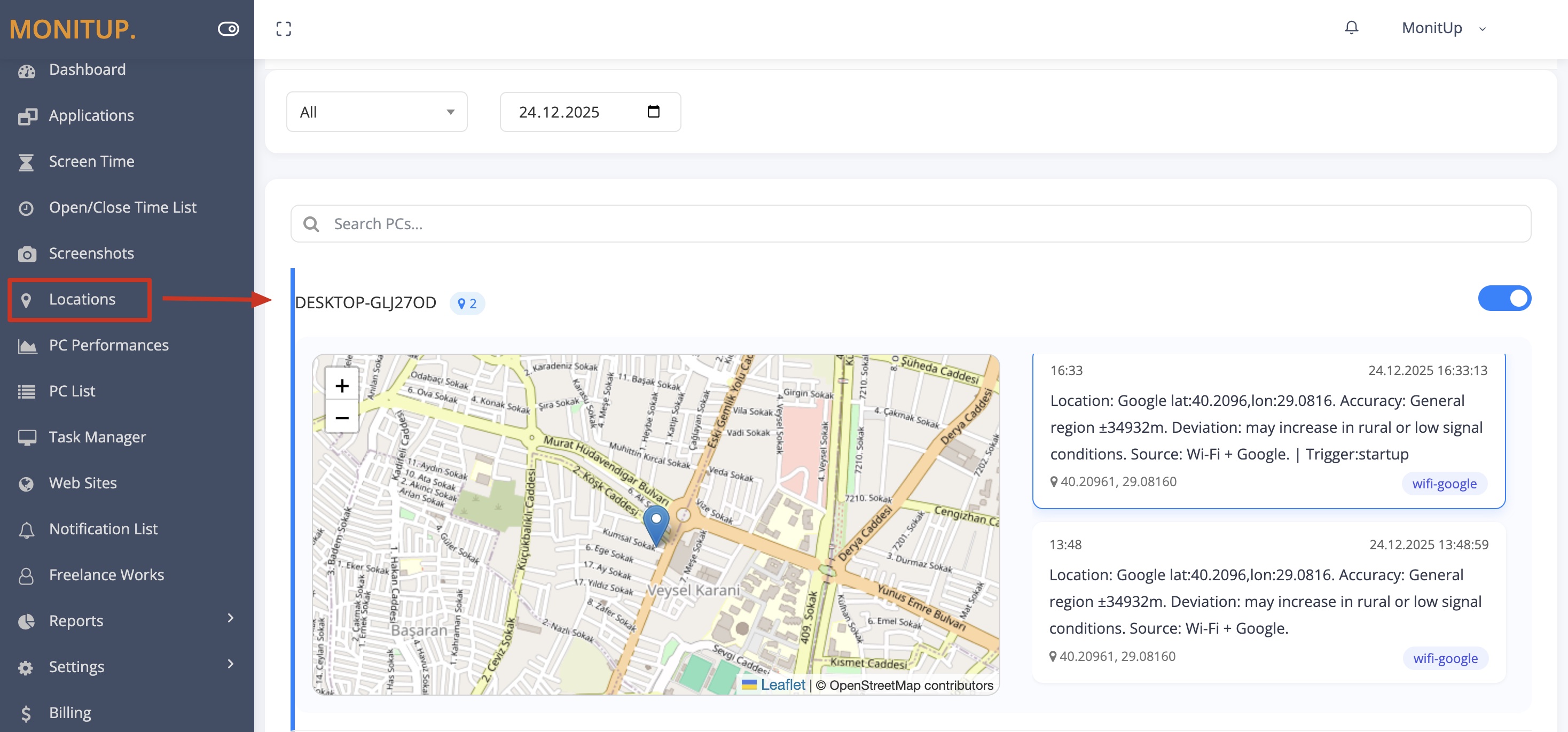
Example dashboard with sample data.
How to Start with MonitUp for Windows Teams
- Create your MonitUp account.
- Choose the plan that matches your visibility needs.
- Install the Windows agent on the laptops you want to monitor.
- Review last-known device location, work hours, app usage, website activity, screenshots on Premium, and productivity reports from the dashboard.
To understand the setup flow before starting, see how MonitUp works .
FAQs
How do I track a stolen laptop without GPS?
Use last-known device location at city or region level together with timestamps, account activity, audit logs, and device activity records to build an incident timeline. If the laptop reconnects, the last-known record can update again.
Can I see laptop location history?
Yes. With a last-known approach, you can review a per-device location history timeline and use it for incident reports, internal audits, security reviews, or insurance documentation.
Does MonitUp use real-time GPS tracking?
No. MonitUp focuses on practical Windows work visibility. Location-related visibility should be understood as last-known city-level or region-level signals, not live street-level GPS tracking.
Can VPNs affect stolen laptop tracking?
Yes. VPN exit nodes can show their own city instead of the laptop’s actual city. If your organization uses VPN heavily, treat the result as network location unless your internal policy says otherwise.
What if the laptop never reconnects?
If the laptop never reconnects, you can only use the last recorded location and activity records. Even then, these records can support incident documentation, insurance workflows, and internal security reviews.
Is employee and location tracking legal?
It depends on your jurisdiction, workplace policy, employee notice, consent requirements, and legal basis. Companies should configure monitoring in a way that matches their internal policies and applicable laws.
When does MonitUp make sense for stolen laptop incidents?
MonitUp makes sense when you need last-known device location together with work activity, app usage, website activity, screenshots on Premium, work-hour visibility, and reporting for Windows teams.
Turn incident response into a clear timeline
See last-known location and work activity in one dashboard
Start a 7-day trial, install the Windows agent, and review last-known device location, work hours, app usage, website activity, screenshots on Premium, and productivity reports from your dashboard.