Track Lost or Stolen Laptops & Monitor Remote Teams with Last-Known Device Location (No GPS)
Updated Mar 2026
Need to track lost or stolen laptops without GPS? Most companies do not need live GPS surveillance. They need a practical way to see where a Windows laptop was last active, review a clear device history, and support audits, security reviews, remote work checks, or incident response.
MonitUp’s last-known device location helps Windows teams review city-level location signals, timestamps, and device activity context — without turning employee monitoring into live GPS tracking.
Quick Answer
- For lost or stolen laptops: Review last-known city or region, timestamp, and activity history.
- For remote teams: Use location history as one signal for audit, asset visibility, and regional work review.
- Important limitation: This is not live GPS tracking and does not show a street-level location.
- For Windows teams: MonitUp can combine last-known device location with work hours, app usage, website activity, screenshots on Premium, and reports.
For lost laptop review
Last-known city-level signals can help IT and operations teams build a timeline for security, insurance, or internal review.
For remote team visibility
MonitUp helps Windows teams connect device location history with work activity, productivity reports, and policy-friendly oversight.
Last-known location for Windows teams
Need device location history without live GPS surveillance?
MonitUp helps Windows-based teams review last-known device location, work hours, app usage, website activity, screenshots on Premium, and productivity reports — without keylogging or live GPS tracking.
Read the laptop location guide | Track a stolen laptop without GPS | Explore MonitUp features
Table of Contents
- What Last-Known Device Location Means
- Why Location Tracking Matters for Companies
- Use Case 1: Lost or Stolen Laptop Review
- Use Case 2: Remote and Hybrid Team Visibility
- How MonitUp Location Tracking Works
- Inside the Dashboard
- Accuracy, VPNs, and Limitations
- Privacy and Compliance Notes
- FAQs
What Last-Known Device Location Means
Last-known device location is a privacy-conscious way to review laptop location. Instead of following a person in real time, it records the most recent city or region where a Windows laptop was active.
- Not live GPS tracking: it does not show a street-level location.
- Activity-based: location records update when the laptop is active and online.
- Useful for audits: admins can review timestamps and location history.
- Better than guesswork: teams can build a clearer incident or asset timeline.
This makes it useful for lost laptop reviews, remote work audits, asset visibility, and regional policy checks — without relying on invasive GPS-style tracking.
Why Location Tracking Matters for Companies
Over the last few years, two trends collided: laptops became the primary work device, and work moved outside the office. Employees now work from homes, cafés, coworking spaces, client sites, and different cities.
As a result, IT and operations teams need answers to practical questions:
- Where was this laptop last active before it disappeared?
- Do we have a location history for this device?
- Was this device used from an expected city or region?
- Can we export a clear record for an incident, audit, or insurance workflow?
Traditional GPS tracking can be invasive and difficult to justify for normal workplace use. Doing nothing also leaves companies with blind spots. Last-known device location is a practical middle ground.
Use Case 1: Lost or Stolen Laptop Review
When a laptop goes missing, the first hours matter. Internal security, IT, insurance, and management usually need a simple answer:
“Where was the laptop last active, and when?”
MonitUp can help teams review:
- Last-known city or region where the laptop was active
- Date and time of last visible activity
- Device identity connected to the employee or asset record
- Work activity context such as apps, websites, and screenshots on Premium
This does not guarantee recovery, but it can reduce uncertainty and support a cleaner incident workflow.
Use Case 2: Remote and Hybrid Team Visibility
Remote work unlocked flexibility, but it also created operational uncertainty. Some organizations have country-based contracts, client restrictions, regional security policies, or timezone-dependent collaboration rules.
Last-known device location can help answer questions such as:
- Which city or region was this device active from today?
- Did a remote employee’s device appear in a new country unexpectedly?
- Are company laptops being used from approved regions?
- Does the location history match the company’s remote work policy?
This is not micromanagement when it is used correctly. It is operational clarity for distributed teams, especially when location history is combined with work-hour visibility and audit records.
Location history is stronger with work activity context
A city-level location signal can answer where a device was active. But remote and hybrid teams usually need more context: work hours, app usage, website activity, screenshots on Premium, and productivity reports.
MonitUp connects last-known device location with Windows work activity reporting — without keylogging or live GPS surveillance.
How MonitUp Location Tracking Works
MonitUp is designed around a practical workflow for Windows teams. It focuses on last-known device visibility rather than live person tracking.
1. Capture
The Windows agent records activity and network-based signals when the device is active and online.
2. Resolve
Signals are interpreted at city or region level, not as live street-level GPS coordinates.
3. Store
Records are stored with timestamps so admins can review location history when needed.
4. Review
Admins can review device history together with work activity, reports, and screenshots on Premium.
Inside the Dashboard
- Last-known city or region per Windows device
- Location history timeline
- Device and employee context
- Filters by employee, device, or date where available
- Data that can support audits, reports, or incident workflows
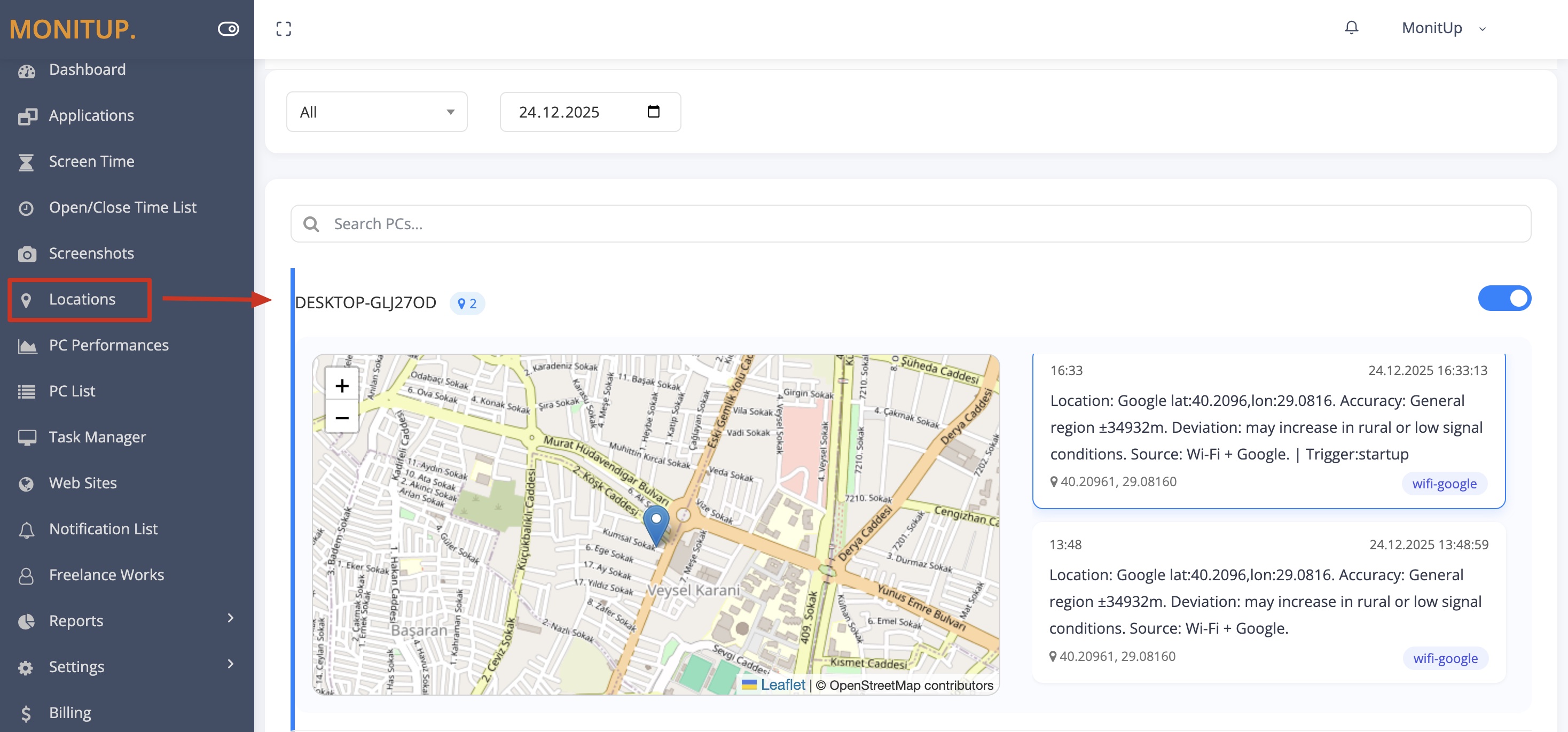
Example dashboard with sample data.
Accuracy, VPNs, and Limitations
Location tracking without GPS has tradeoffs. Set expectations clearly before using location history in an audit or incident workflow.
- City-level accuracy: useful for city or region, not street addresses.
- VPN impact: VPN exit nodes may show the VPN city, not the device’s true city.
- Offline devices: if the laptop never connects again, you can only review the last recorded location.
- Shared networks: coworking spaces, hotspots, and shared Wi-Fi can reduce precision.
- No recovery guarantee: location history can support an incident process, but it cannot guarantee a device will be recovered.
Privacy and Compliance Notes
Location features can be sensitive. Companies should configure and use them with clear internal rules, employee notice, role-based access, and a legitimate business purpose.
- Use city-level location: avoid street-level employee tracking for normal workplace visibility.
- Explain the purpose: asset protection, security, remote work audits, and compliance reviews.
- Control access: limit who can view location history and audit access where possible.
- Follow local rules: requirements vary by country, state, and workplace policy.
- Document the rollout: explain what is collected, why it is collected, and how it is used.
MonitUp can support privacy-conscious workflows, but legal compliance depends on your jurisdiction, policies, employee notice, consent requirements, and how the product is used.
How to Start with MonitUp for Windows Teams
- Create your MonitUp account.
- Choose the plan that matches your visibility needs.
- Install the Windows agent on the laptops you want to monitor.
- Review last-known device location, work hours, app usage, website activity, screenshots on Premium, and productivity reports from the dashboard.
- Use location history as one part of your asset, security, and remote work review process.
To understand the setup flow before starting, see how MonitUp works .
FAQs
Is MonitUp location tracking real-time GPS tracking?
No. MonitUp focuses on last-known city-level or region-level device location signals. It is not live street-level GPS tracking.
Can I use MonitUp to track lost or stolen laptops?
MonitUp can help you review the last-known location, timestamps, and activity context for a Windows laptop. It can support an incident workflow, but it does not guarantee device recovery.
Can I see laptop location history?
Yes. With a last-known location approach, admins can review a location history timeline and use it for audits, security reviews, or incident reports.
Can VPNs affect location accuracy?
Yes. VPN exit nodes may show their own city instead of the laptop’s actual city. If your company uses VPN heavily, treat the result as network location unless your internal policy says otherwise.
Is employee location tracking legal?
It depends on your jurisdiction, workplace policy, employee notice, consent requirements, and legal basis. Companies should use transparent policies and follow applicable laws.
Which teams benefit most from last-known device location?
Remote teams, hybrid teams, IT teams, operations teams, project firms, law firms, and companies managing distributed Windows laptops can benefit from last-known device location as part of a broader visibility and audit workflow.
Track device history without live GPS
See last-known location and work activity in one dashboard
Start a 7-day trial, install the Windows agent, and review last-known device location, work hours, app usage, website activity, screenshots on Premium, and productivity reports from your dashboard.