MonitUp vs Time Doctor: Which Employee Monitoring Tool Fits Your Team?
Updated Mar 2026
Trying to decide between MonitUp and Time Doctor? Both tools help teams understand how work time is spent, but they are not the same kind of fit. One is a better match for Windows-first small teams that want practical productivity visibility without a heavy rollout. The other is often a stronger fit for businesses that want deeper workforce analytics, stronger oversight, and a more structured monitoring model. This guide compares MonitUp vs Time Doctor in plain language so you can choose the right tool for your team, reporting style, and culture.
See MonitUp pricing | Read the Windows team tools guide | Read the broader apps comparison
Quick Answer
- Choose MonitUp if you want a cleaner Windows-first rollout with app usage, website tracking, screenshots, and practical productivity reporting.
- Choose Time Doctor if your team wants stronger workforce analytics, tighter manager oversight, and a more structured monitoring workflow.
- Choose based on team culture as much as features. The biggest difference is not only what they track, but how heavy the system feels in day-to-day management.
Table of Contents
- What Is the Main Difference?
- Side-by-Side Comparison
- Who MonitUp Is Best For
- Who Time Doctor Is Best For
- Screenshots and Visibility
- App and Website Tracking
- Reporting and Manager Use
- Rollout and Team Adoption
- Pricing Logic
- Final Verdict
- FAQs
What Is the Main Difference Between MonitUp and Time Doctor?
The fastest way to understand the difference is this:
- MonitUp is usually the better fit for Windows-heavy small and mid-sized teams that want practical visibility, productivity categorization, screenshots, and manager reporting without making the system feel too heavy.
- Time Doctor is often the better fit for companies that want a more structured workforce analytics and monitoring setup, especially when leadership expects stronger oversight and more formal control.
Both can help you answer “Where is time going?” But they often appeal to different management styles.
MonitUp vs Time Doctor: Side-by-Side
MonitUp
Best for: Windows-first small teams
Strength: Practical productivity visibility
Feels like: Lighter, easier to explain internally
Trade-off: Best fit when Windows is your main environment
Time Doctor
Best for: Teams wanting stronger workforce analytics
Strength: Deeper oversight and structured monitoring
Feels like: More formal and manager-driven
Trade-off: Can feel heavier for lighter-touch teams
Who MonitUp Is Best For
MonitUp is the better choice when your team mainly uses Windows PCs and you want a system that gives managers useful answers without creating unnecessary rollout friction.
MonitUp is usually the better fit if you want:
- App and website tracking on Windows devices
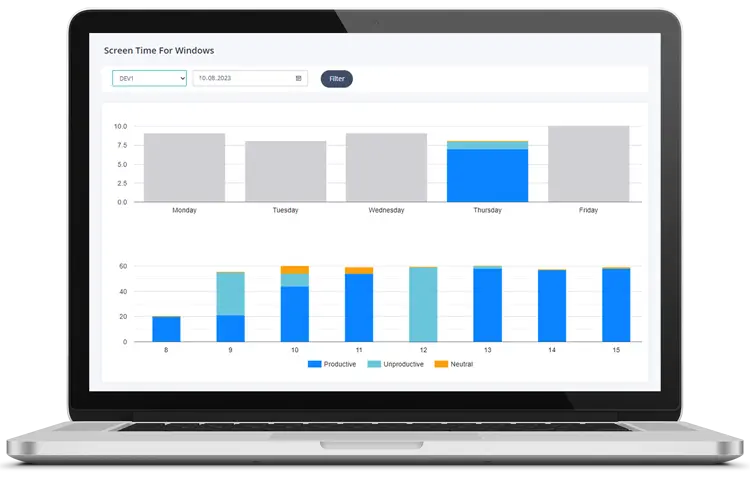
- Productive, unproductive, and neutral activity categories
- Screenshots with a privacy-friendlier feel
- Simple reporting for managers and founders
- A tool that is easier to explain to a 5-50 person team
It is especially strong when the goal is not “watch everything,” but “understand work patterns clearly enough to improve them.”
Who Time Doctor Is Best For
Time Doctor is the better choice when you want a more structured monitoring model and stronger workforce analytics posture. It is often a better fit for companies that already expect closer visibility, more formal manager controls, or more detailed operational reporting.
Time Doctor is usually the better fit if you want:
- A more established workforce analytics workflow
- Stronger oversight and more formal manager reporting
- A system that fits teams already comfortable with close monitoring
- More emphasis on operational control than lightweight adoption
If your leadership style leans toward structured reporting and tighter accountability, Time Doctor may feel more aligned out of the box.
Screenshots and Visibility
This is one of the biggest decision points.
MonitUp works well for teams that want screenshots as part of a balanced visibility setup, not as the whole story. The value is in combining screenshots with app usage, website usage, work hours, and productivity categories.
Time Doctor is often chosen by teams that want screenshots inside a more formal monitoring workflow. If your company already accepts closer oversight and wants a more manager-controlled system, Time Doctor can be more aligned with that culture.
The practical question is not “Does it have screenshots?” It is: How central do you want screenshots to be in the management model?
App and Website Tracking
Both tools are in this category because users want more than a simple timer.
MonitUp is strong when you want to see which apps and websites are consuming time on Windows devices, then classify those patterns into something managers can actually use.
Time Doctor is strong when you want app and web visibility inside a broader workforce analytics system that leadership can use for more structured performance oversight.
If your question is “What are people using and is it productive?”, MonitUp often feels more direct. If your question is “How do we build a more formal monitoring operation?”, Time Doctor often feels more natural.
Reporting and Manager Use
Managers usually care about reporting more than raw data. The real test is whether the tool helps answer:
- Who is overloaded?
- Where is time leaking?
- Which apps and sites dominate the workday?
- How much time is productive versus distracting?
MonitUp is usually easier for founders, team leads, and smaller managers who want useful reporting without building a big process around the tool.
Time Doctor is usually stronger for companies that want reporting as part of a more formal management system with clearer oversight expectations.
Rollout and Team Adoption
Rollout friction matters more than many teams expect.
A tool can be powerful and still fail if employees reject it or managers struggle to explain why it exists.
MonitUp tends to be easier to position internally when the company message is about visibility, productivity improvement, and work pattern clarity.
Time Doctor tends to fit better when the company is already comfortable saying, “We want stronger formal monitoring and structured manager oversight.”
So the choice is not only product fit. It is also communication fit.
Pricing Logic
Do not choose purely by list price. Vendor pricing changes, billing models change, and plan differences often matter more than the headline number.
Instead, compare the cost logic this way:
- MonitUp: Best evaluated on how quickly it gives your Windows team usable visibility and practical reporting.
- Time Doctor: Best evaluated on whether your team will actually use its stronger monitoring and workforce analytics depth.
If a heavier system adds friction your team does not need, the cheaper-looking option may still cost more in adoption and trust.
Want to compare with your own team data?
Start a MonitUp trial and see how app usage, website activity, screenshots, and productivity reports look on real Windows devices.
Start Free TrialFinal Verdict
If you want a Windows-first employee monitoring and productivity tool that feels practical, understandable, and easier to roll out in a smaller team, MonitUp is the stronger fit.
If you want a more formal workforce analytics and monitoring setup with tighter oversight expectations, Time Doctor is often the stronger fit.
That is why the best choice depends less on feature checklists and more on team size, management style, and how heavy you want monitoring to feel.
FAQs
Is MonitUp a good Time Doctor alternative?
Yes, especially for Windows-first small teams that want practical visibility, screenshots, app and website tracking, and productivity reporting without adopting a heavier workforce monitoring culture.
Which is better for small teams: MonitUp or Time Doctor?
For many small Windows-based teams, MonitUp is the easier fit because it balances visibility with simpler rollout. Time Doctor is often a better fit when the team wants stronger formal monitoring from the start.
Which tool feels less heavy for employees?
MonitUp is often the lighter-feeling option for teams that want visibility without making monitoring the center of the workflow. Time Doctor is better aligned with companies that prefer a more structured monitoring model.
Do both tools support screenshots and activity tracking?
Yes, both are used by teams that want more than basic timers. The bigger difference is how central screenshots and formal oversight feel inside the overall management style.