Best Screen Time Tracking Apps for Windows PC (2026 Review)
Updated Mar 2026
Looking for the best screen time tracking app for Windows? The right choice depends on what you need. Some tools are better for personal focus, some are stronger for project time tracking, and others are built for team visibility, screenshots, and productivity reporting. This guide compares popular Windows screen time tools, explains who each one is best for, and shows where built-in Windows options still fall short.
If your goal is personal habit awareness, one tool may be enough. If your goal is manager visibility, app and website tracking, work-hour visibility, screenshots on Premium, and productivity reporting across a Windows team, your shortlist usually looks very different.
Quick Answer
- Best for Windows-first small teams: MonitUp
- Best for individual focus habits: RescueTime
- Best for project and billable time tracking: TimeCamp
- Best for heavier oversight and screenshots: Hubstaff
- Best no-install baseline: Windows built-in tools, but they are limited
For personal use
Choose a lighter tool if your goal is mainly distraction control, focus improvement, or personal awareness.
For team visibility
Choose a Windows-focused tool like MonitUp if you need app and website visibility, work-hour reports, screenshots on Premium, productivity categories, and manager reporting.
Screen time tracking for Windows teams
Need a screen time tracking app for a Windows team?
Personal screen time tools can help one user understand habits. MonitUp is built for Windows-based teams that need app usage, website activity, work-hour visibility, screenshots on Premium, and productivity reports — without keylogging.
See MonitUp pricing | Explore MonitUp features | Read the full Windows screen time guide
Table of Contents
- How We Evaluated These Apps
- Quick Comparison
- MonitUp
- RescueTime
- TimeCamp
- Hubstaff
- What About Built-in Windows Tools?
- How to Choose the Right App
- FAQs
How We Evaluated These Apps
We looked at the tools through a practical Windows-user lens, focusing on the questions buyers usually care about most:
- Activity visibility: Can you clearly see app and website usage?
- Team reporting: Is it useful for teams, not just individuals?
- Productivity insight: Does it help you understand productive vs. distracting time?
- Screenshots and oversight: Does it support higher-visibility monitoring when needed?
- Ease of rollout: Is it realistic for a small or mid-sized Windows team to deploy?
Because vendor pricing changes frequently and often depends on billing cadence, plan level, and seat count, treat all pricing as “check current vendor pricing before purchase.”
Quick Comparison
MonitUp
Best for: Windows-first small and mid-sized teams
Strength: App and website visibility, screenshots on Premium, productivity categories, team reports
Trade-off: Best fit if Windows is your core environment
RescueTime
Best for: Individuals and focus improvement
Strength: Personal habit awareness and distraction control
Trade-off: Lighter team-management depth
TimeCamp
Best for: Project and billable time workflows
Strength: Time tracking tied to tasks and reporting
Trade-off: Less focused on pure screen-time visibility
Hubstaff
Best for: Remote teams needing stronger oversight
Strength: Screenshots, activity levels, app and URL visibility
Trade-off: Can feel heavier than needed for simple screen-time use
1. MonitUp
Best for: Windows-based teams that want a practical balance of time tracking, screen-time visibility, screenshots on Premium, and productivity reporting.
MonitUp is a strong fit for companies that want to understand how work time is actually spent on Windows PCs. It tracks app and website usage, supports screenshots on Premium, and lets teams classify activities as productive, unproductive, or neutral. That makes it more useful than a basic personal screen-time app when the real goal is managing productivity across a team.
What stands out
- Clear app and website visibility
- Productivity categorization
- Team-level reporting
- Screenshots on Premium
- No keylogging
- Windows-first rollout that is simple to explain to managers
- 7-day trial available
Where it fits best
MonitUp is a good choice for remote, hybrid, and office-based Windows teams that want more than just personal habit tracking. It is especially useful when managers need a cleaner answer to questions like “Where is time going?” and “Which apps or sites are creating the biggest productivity leaks?”
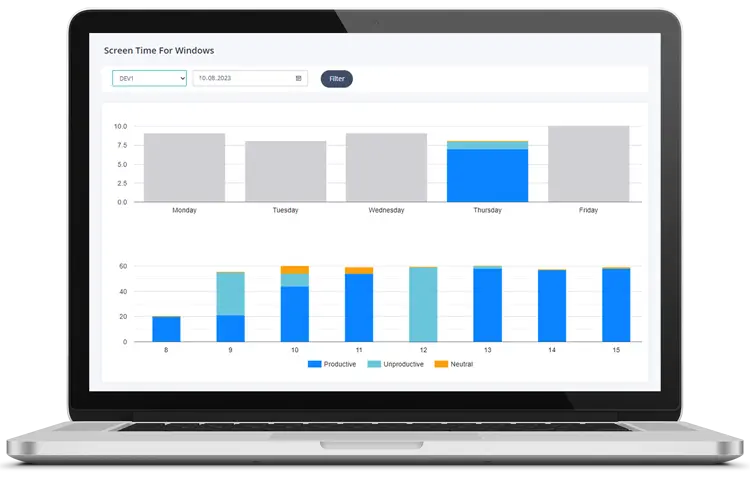
Personal screen time apps are not enough for teams
A personal screen time app can help one user improve focus. But managers usually need more context: app usage, website activity, work-hour visibility, screenshots on Premium, and productivity reports across multiple Windows PCs.
MonitUp turns Windows activity into a practical visibility dashboard for teams — without keylogging.
2. RescueTime
Best for: Individuals, freelancers, and knowledge workers who want to improve focus.
RescueTime is well known for helping users understand how they spend time on apps and websites. It is especially strong for personal awareness and distraction control. If your main goal is improving your own focus habits, it remains a solid option.
Pros
- Good for personal visibility and habit change
- Useful for reducing distraction and improving focus
- Simple concept for solo users
Cons
- Less team-oriented than tools built for manager visibility
- Not the strongest fit when you need screenshots or deeper oversight
3. TimeCamp
Best for: Teams that care more about project-based time tracking than pure screen-time visibility.
TimeCamp is strongest when time tracking is tied to tasks, projects, budgets, or billable work. If your team already manages time through project workflows, it can be a better fit than a pure screen-time monitoring tool.
Pros
- Good fit for project and client work
- Useful reporting for time allocation
- More natural for task-driven teams
Cons
- Less centered on screen-time behavior itself
- Not the clearest choice if you mainly want app and website visibility on Windows PCs
4. Hubstaff
Best for: Businesses that want more structured oversight, including screenshots and stronger activity monitoring.
Hubstaff is a more feature-heavy platform. It can be a strong fit for remote teams that need screenshots, app and URL usage, idle-time awareness, and payroll or workforce-management workflows in the same ecosystem.
Pros
- Stronger oversight options
- Screenshots and activity visibility
- Useful for larger or more process-driven teams
Cons
- Can feel too heavy if you only want lightweight screen-time tracking
- May be more than a small team needs
What About Built-in Windows Tools?
If you want a no-install baseline, Windows can give you partial clues through Microsoft Family Safety, battery usage, uptime checks, and battery reports. But it still does not provide a simple business-ready screen-time dashboard for most teams.
That means built-in tools are fine for rough personal checks, but they usually fall short when you want:
- team-wide visibility,
- app and website breakdowns,
- productivity categorization,
- screenshots on Premium, or
- clear manager reporting.
If you want to understand the built-in options in more detail, see our full Windows screen time guide.
How to Choose the Right App
The easiest way to choose is to match the tool to your real use case:
- Choose MonitUp if you run a Windows-first team and want work activity visibility plus productivity reporting.
- Choose RescueTime if your goal is personal focus and distraction control.
- Choose TimeCamp if your workflows are built around projects, budgets, and billable hours.
- Choose Hubstaff if you need heavier oversight, screenshots, and more operational control.
If you are still deciding, start with the question: Do I want better personal habits, or better team visibility? That one answer usually narrows the shortlist quickly.
For a more manager-focused breakdown, read our screen time guide for business owners and IT managers.
Final Verdict
There is no single best screen time tracking app for every Windows user. The best tool depends on whether you want personal focus improvement, project time tracking, or business-level productivity visibility.
For Windows-based teams that want practical reporting without jumping straight into a heavyweight platform, MonitUp is a strong place to start. For solo focus, RescueTime is compelling. For project-centered tracking, TimeCamp makes more sense. For deeper oversight, Hubstaff is often the better fit.
How to Start with MonitUp for Windows Teams
- Create your MonitUp account.
- Choose the plan that matches your visibility needs.
- Install the Windows agent on the PCs you want to monitor.
- Review app usage, website activity, work hours, screenshots on Premium, and productivity reports from the dashboard.
To understand the setup flow before starting, see how MonitUp works .
FAQs
What is the best screen time tracking app for Windows teams?
For Windows-based teams, the best tool depends on what you need most. MonitUp is a strong fit for productivity visibility, RescueTime is better for individual focus, TimeCamp is stronger for project time tracking, and Hubstaff is stronger for heavier oversight.
Does Windows have a built-in screen time tracker?
Windows offers partial tools, but not a simple business-ready screen-time dashboard for most teams. That is why many businesses use a dedicated tool instead.
Which tool is best for screenshots and closer monitoring?
Hubstaff and MonitUp are the better fits when you need stronger visibility beyond basic app timers. The right choice depends on how heavy or lightweight you want the oversight to feel.
Which tool is best for freelancers or solo users?
RescueTime is usually the strongest fit when the main goal is improving personal focus and reducing distraction.
When should I choose MonitUp?
Choose MonitUp when your team mainly uses Windows PCs and you need app usage, website activity, work-hour visibility, screenshots on Premium, and productivity reporting from one dashboard.
Choose the right screen time tool for your team
Start monitoring Windows work activity in minutes
Start a 7-day trial, install the Windows agent, and see app usage, website activity, work hours, screenshots on Premium, and productivity reports from one dashboard.