Best Windows Screen Time Tools for Teams (2026 Review)
Updated Mar 2026
Looking for the best Windows screen time tool for a team? The right choice depends on what kind of visibility you need. Some tools are better for lightweight productivity reporting, some are built for screenshots and closer employee oversight, and some are stronger for personal focus than for team management. This guide compares Windows screen time tools from a manager’s perspective and helps you choose the right fit for remote, hybrid, and office teams.
See MonitUp pricing | Read the broader apps comparison | Read the full Windows screen time guide
Quick Answer
- Best for Windows-first small teams: MonitUp
- Best for stronger monitoring workflows: Time Doctor
- Best for heavier operational oversight: Hubstaff
- Best for individual focus, not team visibility: RescueTime
Table of Contents
- What Matters in a Windows Screen Time Tool for Teams
- Quick Comparison
- MonitUp
- Time Doctor
- Hubstaff
- RescueTime
- Why Built-in Windows Tools Are Not Enough
- How to Choose the Right Tool
- FAQs
What Matters in a Windows Screen Time Tool for Teams
When managers look for a Windows screen time tool, they are usually not just asking, “How long was the PC on?” They want answers to practical questions like:
- Which apps are used most during working hours?
- Which websites consume productive time?
- When do employees start and end their day?
- Do we need screenshots or is lightweight reporting enough?
- Can managers review trends without micromanaging?
That is why a team-focused Windows tool should be judged on visibility, reporting, screenshots, rollout simplicity, and how comfortable it feels for the company culture.
Quick Comparison
MonitUp
Best for: Windows-first small teams
Strongest point: Balanced visibility and productivity reporting
Trade-off: Best fit when Windows is your core environment
Time Doctor
Best for: Teams that want screenshots and stronger monitoring
Strongest point: Closer oversight
Trade-off: Can feel more invasive
Hubstaff
Best for: Remote operations and workforce control
Strongest point: Operational depth
Trade-off: Heavier than many teams need
RescueTime
Best for: Individual focus improvement
Strongest point: Personal habit visibility
Trade-off: Lighter for team management
1. MonitUp
Best for: Windows-based teams that want practical manager visibility without jumping straight into a heavyweight monitoring stack.
MonitUp is a strong fit for businesses that want to understand how work time is spent across Windows PCs. It tracks app and website usage, supports screenshots on eligible plans, and helps teams classify activity as productive, unproductive, or neutral. That makes it useful for companies that want real reporting, not just raw screen-on time.
What managers usually like
- Clear app and website usage visibility
- Productivity categorization
- Simple team reporting
- Cleaner rollout for Windows-heavy companies
- Good balance between visibility and usability
Trade-offs
- Best fit when your environment is mainly Windows
- Not the right choice if you want an extremely heavy surveillance style
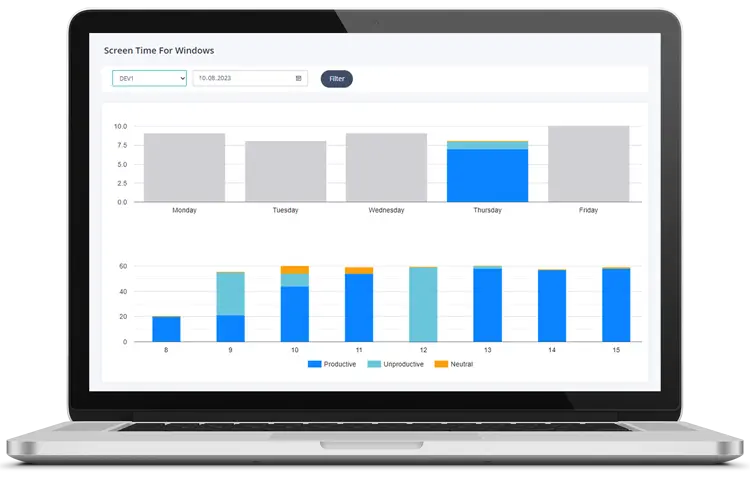
Want to see how your team really uses Windows PCs?
Start a free trial and review app usage, website activity, screenshots, and productivity trends with MonitUp.
Start Free Trial2. Time Doctor
Best for: Teams that want stronger monitoring, including screenshots and tighter manager oversight.
Time Doctor is often considered when a company wants more than simple time reporting. It is useful for teams that want closer supervision, task-level tracking, and monitoring workflows that feel more structured and manager-driven.
Pros
- Stronger oversight model
- Useful when screenshots are part of the workflow
- Better fit for companies that already expect close reporting
Cons
- Can feel invasive for some teams
- Not always the best cultural fit for lighter-touch environments
3. Hubstaff
Best for: Remote teams that want more operational control around activity, screenshots, and workforce visibility.
Hubstaff is more than a simple screen time tracker. It usually fits teams that want activity visibility tied to broader remote-work operations, not just app timing. It can be powerful, but it often feels heavier than needed for small teams that mainly want clarity, not control-heavy workflows.
Pros
- Strong oversight options
- Useful for remote-team operations
- Good fit when management wants more structured visibility
Cons
- Can be more tool than a small team needs
- Heavier operational feel than lightweight productivity tools
4. RescueTime
Best for: Individuals, freelancers, and knowledge workers who care more about personal focus than team monitoring.
RescueTime is still a good product, but in a team-focused Windows tools page it belongs in a narrower lane. It is stronger for habit awareness and focus improvement than for manager dashboards, screenshots, or structured employee oversight.
Pros
- Good for personal awareness
- Useful for reducing distraction
- Simple value for solo users
Cons
- Less team-centric
- Not the strongest fit for manager visibility or employee monitoring
Why Built-in Windows Tools Are Not Enough
Windows can offer partial visibility through Family Safety, battery usage, uptime checks, and battery reports. But these tools are not a real manager dashboard for most business environments.
Built-in tools usually fall short when you need:
- team-wide visibility,
- app and website breakdowns,
- productive vs. unproductive categorization,
- screenshots, or
- clear reporting for managers.
How to Choose the Right Tool
The right choice usually comes down to management style and reporting needs:
- Choose MonitUp if you want practical Windows team visibility with productivity reporting.
- Choose Time Doctor if your company is comfortable with stronger monitoring and screenshots.
- Choose Hubstaff if you want heavier remote-work operations and oversight.
- Choose RescueTime if your main goal is improving individual focus, not managing a team.
A simple rule works well here: the more you need manager reporting and team visibility, the less useful a personal habit tool becomes.
Final Verdict
If your goal is just personal screen-time awareness, you do not need a team-focused Windows monitoring tool. But if you manage remote, hybrid, or office-based employees and need a practical view of how time is actually spent, the right tool matters a lot.
For Windows-first small teams, MonitUp is the most balanced starting point. For stronger monitoring culture, Time Doctor is more aligned. For heavier remote-team operations, Hubstaff is often the better fit. For personal focus improvement, RescueTime remains useful.
FAQs
What is the best Windows screen time tool for teams?
The best tool depends on how much visibility you need. MonitUp is a strong fit for Windows-first teams that want productivity reporting, while Time Doctor and Hubstaff are better for stronger oversight. RescueTime is better for individual focus than for team management.
Is there a built-in Windows screen time dashboard for managers?
No. Windows provides partial tools, but not a simple team-ready dashboard for app usage, screenshots, website visibility, and productivity reporting.
Which tool is best if screenshots are important?
Time Doctor and Hubstaff are usually stronger candidates when screenshots and closer oversight are part of the workflow. MonitUp can also fit when you want screenshots alongside a more balanced productivity view.
Which tool is best for personal focus instead of team monitoring?
RescueTime is usually the better fit when your goal is improving individual focus habits rather than managing a team.