How to Check Screen Time on PC
Updated Mar 2026
Want to check screen time on a PC? On Windows, there is no single built-in screen time dashboard for most users like the one many people know from Apple devices. Instead, you usually rely on a few partial tools such as Microsoft Family Safety, battery usage, battery reports, and Task Manager uptime. These can help with rough visibility. For teams and businesses, MonitUp gives you a clearer view with app usage, website activity, screenshots, start and end times, and productivity reports in one place.
This guide explains how to check screen time on a Windows PC, which built-in tools help, where they fall short, and when MonitUp makes more sense for employee monitoring and time tracking.
Quick Answer
- For family use: Use Microsoft Family Safety to review activity and set screen time limits.
- For personal PC usage: Use Battery usage or
powercfg /batteryreportfor rough estimates. - For session length only: Check PC uptime in Task Manager.
- For teams and businesses: Use MonitUp for app usage, website tracking, screenshots, productivity categories, and reporting.
For personal use
Windows built-in tools can be enough if you only want rough device activity, family controls, or battery-based usage clues.
For team visibility
If you need employee monitoring, app and website tracking, screenshots, work-hour visibility, and reporting, MonitUp is the better fit.
See our full Windows screen time guide | Explore employee monitoring software | See pricing
Table of Contents
- What Does Screen Time on PC Mean?
- How to Check Screen Time on PC
- Method 1: Microsoft Family Safety
- Method 2: Battery Usage
- Method 3: Battery Report
- Method 4: Task Manager Uptime
- Why Teams Use MonitUp
- Benefits of Checking Screen Time on PC
- FAQs
What Does Screen Time on PC Mean?
Screen time on PC usually means understanding how long a computer is being used, which applications are active, and in some cases which websites are visited. On Windows, this information is not always available in one simple dashboard, so users often combine several built-in tools depending on what they want to measure.
How to Check Screen Time on PC
If you want to check screen time on a Windows PC, it helps to separate three different needs:
- Family or child monitoring – checking usage and setting limits.
- Technical usage clues – using battery data or uptime to estimate activity.
- Business time tracking and employee monitoring – seeing app usage, website activity, work hours, and productivity trends.
Windows can partially help with the first two. For the third, a purpose-built tool like MonitUp is much more practical.
Method 1: Microsoft Family Safety
Microsoft Family Safety is the closest built-in option to a real screen time tool on Windows. It works best for family groups and child accounts, not for business reporting.
What it is good for
- Viewing device and app activity for family members
- Setting total screen time limits
- Managing app and game limits across connected devices
How to use it
- Open Settings on Windows.
- Go to Accounts and then your family settings.
- Add the account to your Microsoft family group if needed.
- Open the Family Safety dashboard online or in the Family Safety app.
- Review activity and configure screen time limits.
Family Safety is useful for home use. It is not designed for employee monitoring, productivity tracking, or business reporting.
Method 2: Battery Usage
On laptops, Windows can show which apps used the most battery over a selected period. This is not a true screen time dashboard, but it gives a rough clue about recent usage.
How to find it
- Open Settings.
- Go to System > Power & battery.
- Open Battery usage.
- Review which apps used the most battery over the selected period.
Limitations
- Works best on laptops, not desktops
- Does not show a real employee time sheet
- Does not classify apps as productive or unproductive
- Does not provide website-level visibility
Method 3: Battery Report
Advanced users can generate a battery report from the command line. This is more helpful for troubleshooting or rough usage analysis than for everyday screen time tracking.
- Open Command Prompt or PowerShell as administrator.
- Run this command:
powercfg /batteryreport- Open the generated HTML report from the saved path.
- Review recent battery usage patterns and device history.
This method gives technical clues, but it still does not replace a proper monitoring or reporting tool.
Method 4: Task Manager Uptime
If you only want to know how long the PC has been running since the last restart, Task Manager can help.
- Right-click the taskbar and open Task Manager.
- Go to the Performance tab.
- Check the Up time value under CPU.
This is useful for a quick session-length check, but it is not the same as screen time. It cannot show app usage, idle time patterns, or website activity.
Why Teams Use MonitUp
Built-in Windows tools can help with small personal checks, but businesses usually need answers to different questions:
- Which apps are used most during working hours?
- Which websites consume productive time?
- When do employees start and end their day?
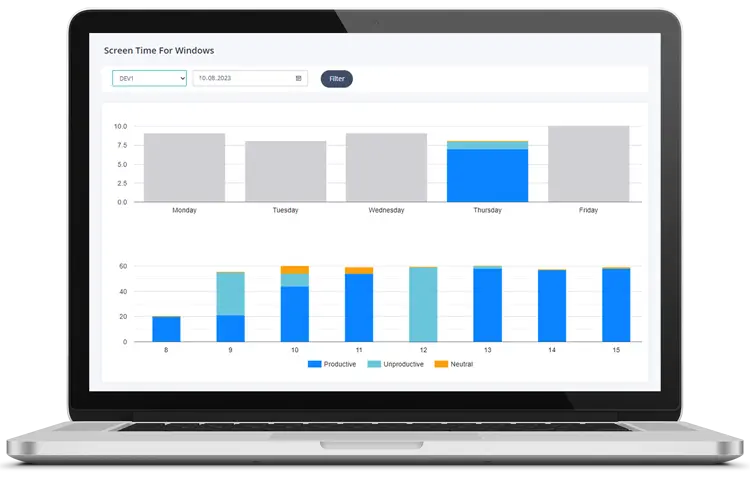
- How much time is productive, neutral, or inefficient?
- Which teams or roles need coaching, not micromanagement?
That is where MonitUp fits better. It helps companies turn rough screen time clues into practical productivity reporting.
What MonitUp shows
- App and website usage by employee and device
- Daily, weekly, monthly, and hourly reports
- Start and end times
- Productive, unproductive, and neutral categories
- Screenshots for better visibility
- AI-powered suggestions based on usage patterns
For broader business visibility, you can also explore employee monitoring software and compare MonitUp pricing plans.
Need More Than Basic Screen Time?
Use MonitUp to track Windows app usage, website activity, and productivity trends across your team.
Start Your 7-Day Trial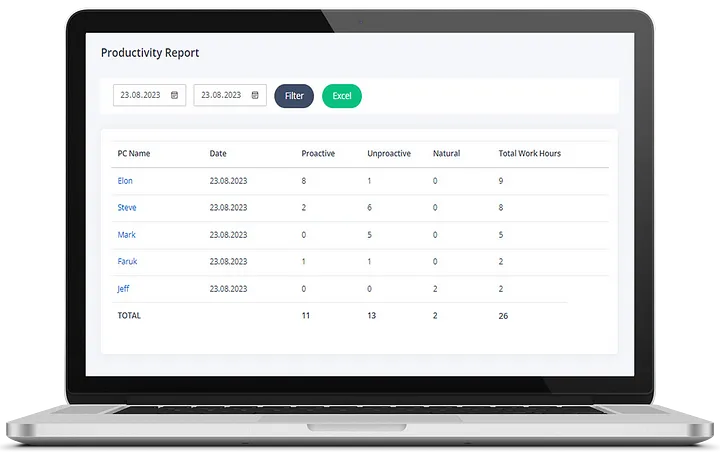
Benefits of Checking Screen Time on PC
- Better visibility: Understand where time goes during the day.
- Higher productivity: Spot distractions earlier.
- Clearer team management: Compare trends across roles and teams.
- More accurate reporting: Use real usage data instead of assumptions.
- Smarter coaching: Improve workflows based on evidence.
Final Thoughts
If you only need a rough personal estimate, Windows can help through Family Safety, battery usage, battery reports, and simple uptime checks. But if you want a real view of employee productivity, Windows alone is not enough.
That is where MonitUp stands out. It helps you move from rough screen time estimates to clear, actionable reporting for apps, websites, screenshots, and team productivity trends.
Turn screen time data into real team visibility
MonitUp helps companies go beyond basic screen time tracking with app usage, website monitoring, screenshots, work-hour visibility, and productivity reporting.
Explore employee monitoring software | See pricing | Read the full Windows guide
FAQs
Does Windows have a built-in screen time dashboard?
Not in the way most people expect. Windows offers partial tools like Family Safety, battery usage, battery reports, and uptime checks, but not one simple dashboard for most users.
How do I check screen time on a Windows PC?
You can use Microsoft Family Safety, Battery usage, powercfg /batteryreport, or Task Manager uptime depending on what you want to measure.
Can I check screen time on a PC without extra software?
Yes, but the built-in options are limited. They can provide rough visibility, but they do not give you a complete business-level dashboard.
When should I use MonitUp instead of built-in tools?
Use MonitUp when you need employee monitoring, app and website tracking, screenshots, productivity categories, or reporting across multiple Windows PCs.