Windows Screen Time Tracker: Track Computer Usage Time
Updated September 2026
Need a Windows screen time tracker that shows where computer time actually goes? Built-in Windows tools can provide a few usage clues, but they do not give teams one continuous view of work hours, applications, websites, active and idle time, and productivity trends. MonitUp fills that gap with automatic tracking and clear reports for Windows-based teams.
This guide explains what a PC usage tracker should measure, how to track computer usage time with MonitUp, and how managers can turn that data into practical decisions without using keylogging. If you only want to review Windows' built-in options, see our guide to checking screen time on a PC.
Quick Answer
To track computer usage time continuously on Windows, install a dedicated Windows agent such as MonitUp. It automatically records work-hour patterns, active and idle time, application usage, and website activity. Managers can then review employee, team, and company-level reports from one dashboard. Screenshots are available on the Premium plan, and MonitUp does not use keylogging.
Windows usage visibility for teams
See apps, websites, work hours, and productivity trends
Start a 7-day trial, install the Windows agent, and review computer activity from one dashboard.
Table of Contents
- What Is a Windows Screen Time Tracker?
- What Should a PC Usage Tracker Measure?
- Built-in Windows Tools vs a Dedicated Tracker
- How to Track Computer Usage Time with MonitUp
- How to Use the Reports
- Who Needs a Windows Usage Tracker?
- Privacy-Conscious Employee Monitoring
- Frequently Asked Questions
What Is a Windows Screen Time Tracker?
A Windows screen time tracker records how a computer is used over time. Instead of showing only how long the PC has been switched on, a dedicated tracker can explain when work starts, how much time is active or idle, which applications and websites are used, and how activity changes across days or weeks.
That distinction matters for businesses. PC uptime alone cannot tell a manager whether time was spent in a project tool, a browser, a communication app, or an unrelated website. A proper tracker turns raw Windows activity into reports that are easier to review and compare.
What Should a PC Usage Tracker Measure?
A useful screen time tracker for Windows should provide more than one total number. Look for the following capabilities:
Work-hour patterns
Review computer start and shutdown times, total tracked time, and daily or weekly work patterns.
App and website usage
See which applications and domains are used and how long employees spend in them.
Active and idle time
Understand whether a device is actively being used instead of treating all powered-on time as work.
Productivity categories
Classify activity as productive, unproductive, or neutral according to each team's workflow.
Teams that require stronger context may also need screenshots. In MonitUp, screenshot review is available on Premium and can be used alongside activity reports rather than keystroke capture.
Built-in Windows Tools vs a Dedicated Screen Time Tracker
Windows offers partial ways to inspect activity, including Microsoft Family Safety, Battery usage, battery reports, and Task Manager uptime. These tools can help with a one-time personal check, but they are not designed to produce continuous employee, team, or company-level reports.
| Capability | Built-in Windows tools | MonitUp |
|---|---|---|
| Basic device-usage clues | Yes | Yes |
| App and website duration | Limited | Yes |
| Active and idle patterns | Not in one business dashboard | Yes |
| Team and company reports | No | Yes |
| Screenshots | No | Premium |
For step-by-step instructions covering the built-in methods, read How to Check Screen Time on PC. Continue below if your goal is automatic and ongoing computer usage tracking.
How to Track Computer Usage Time with MonitUp
1. Create your account
Sign up for MonitUp, choose the plan that matches the level of visibility you need, and start the 7-day trial. Your admin dashboard is created as part of the setup.
2. Install the Windows agent
Download and install the MonitUp agent on the company Windows computers you want to monitor. The agent starts automatically with the computer, so employees do not need to submit manual status updates for standard automatic tracking.
3. Let activity data collect automatically
After installation, MonitUp begins collecting work-hour information, active and idle time, application usage, and website activity. Premium can also include screenshots when your organization needs additional visual context.
4. Configure productivity categories
Mark applications and websites as productive, unproductive, or neutral based on the employee's role. A development tool may be productive for an engineer, while the same category may not apply to another department.
5. Review employee, team, and company reports
Use the dashboard to compare usage patterns over time. Focus on recurring trends, unusual changes, and workflow bottlenecks instead of judging performance from one isolated moment.
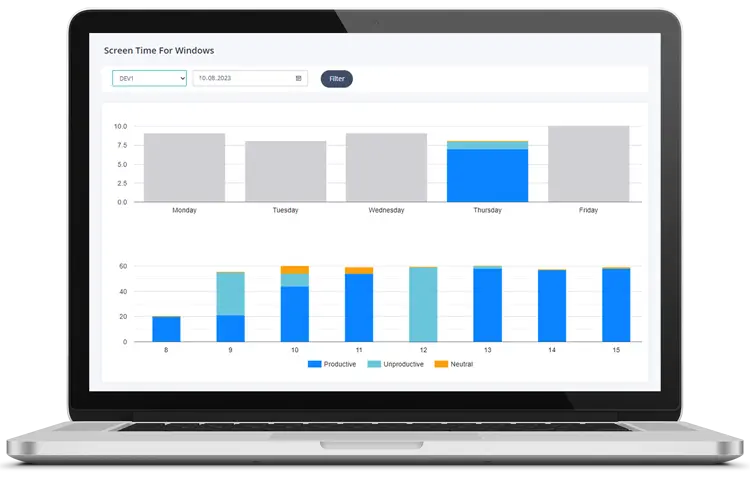
A Windows screen time dashboard can turn raw activity into useful app, website, and productivity reports.
Choose the visibility level your team needs
Use Screen Time for lightweight app, website, and time visibility. Choose Premium when your team also needs screenshots, work-hour visibility, alerts, and deeper reports. Freelancer supports manual start-stop tracking for client-based work.
How to Use Computer Usage Reports Effectively
Tracking is valuable only when it improves decisions. These practices help teams use the data responsibly and productively:
- Define expectations first: Explain working hours, productivity categories, and how monitoring data will be used.
- Compare trends: Review daily, weekly, and monthly patterns rather than focusing on a single session.
- Account for job roles: Different teams use different tools, websites, and workflows.
- Look for workflow problems: Repeated switching, long idle periods, or unusually high time in one tool may indicate a process issue or a need for support.
- Use reports for coaching: Combine activity data with goals, workload, output, and employee context.
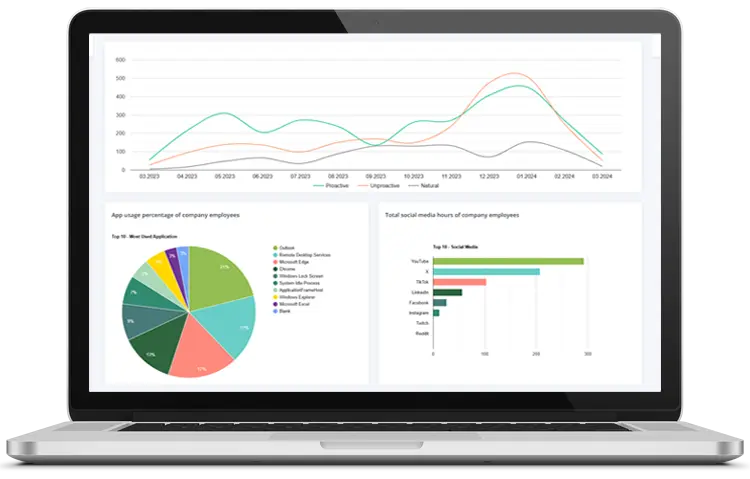
Review recurring usage patterns instead of relying on guesses or isolated snapshots.
Who Needs a Windows Usage Tracker?
- Remote and hybrid teams: Understand work hours, app usage, website activity, and focus patterns across distributed Windows devices.
- Managers: Review team-level trends and identify where coaching, workload adjustments, or clearer processes may help.
- IT and operations teams: Centralize activity visibility across company devices and review unusual patterns.
- Law firms and compliance-sensitive teams: Use reports and optional screenshots when stronger oversight and documentation are required.
- Freelancers and contractors: Use manual start-stop tracking when work must be assigned to clients or projects.
For a broader overview of team monitoring capabilities, visit our employee monitoring software page.
Privacy-Conscious Employee Monitoring
A screen time tracker should be introduced transparently. Tell employees what is collected, why it is needed, who can access it, and how long the information is retained. Configure monitoring around legitimate business needs, follow applicable employment and privacy laws, and limit access to authorized people.
MonitUp focuses on work-hour visibility, applications, websites, active and idle time, productivity reports, and screenshots on Premium. It does not use keylogging. Organizations can also evaluate cloud or on-premise deployment depending on their infrastructure requirements.
Track Windows usage automatically
Turn computer activity into useful reports
Install the Windows agent and review work hours, apps, websites, active and idle time, productivity trends, and Premium screenshots from one dashboard.
Frequently Asked Questions
Does Windows have a built-in screen time tracker?
Windows provides partial tools such as Microsoft Family Safety, Battery usage, battery reports, and Task Manager uptime. These can help with basic checks, but they do not provide one continuous business dashboard for work hours, app usage, websites, active and idle time, and team reports.
How can I track computer usage time on Windows?
Install a Windows usage tracker such as MonitUp on the computers you are authorized to monitor. The agent collects activity automatically, and authorized managers can review work-hour, app, website, active-time, idle-time, and productivity reports from the dashboard.
Can MonitUp track applications and websites?
Yes. MonitUp tracks application usage duration and website or domain activity. Activity can be categorized as productive, unproductive, or neutral for clearer reporting.
Can I track multiple Windows PCs?
Yes. MonitUp is designed to provide employee, team, and company-level visibility across multiple Windows computers from a central dashboard.
Does MonitUp take screenshots?
Screenshots are available on the Premium plan for organizations that need stronger visual context. They should be configured and used in line with company policy and applicable privacy laws.
Does MonitUp use keylogging?
No. MonitUp focuses on work hours, app usage, website activity, active and idle time, productivity reports, and optional screenshots rather than capturing keystrokes.
Is MonitUp suitable for remote and hybrid teams?
Yes. MonitUp is built for Windows-based remote and hybrid teams that need centralized visibility into work hours, applications, websites, productivity trends, and optional screenshots.